Pages

Senin, 01 September 2014

Best Android Phones [September 2014]


Phandroid


Best Android Phones [September 2014]


best-phones-hero


As summer winds down we are once again ranking our favorite Android phones. Some familiar names made our list, but which handset came out on top? Will the fall’s big announcements shake things up in the coming weeks? Read on to find out.


Previously: August | July | June | May | April | March | February


5. Sony Xperia Z2


Sony Xperia Z2 Damaged_1


When a phone spends six weeks at the bottom of the ocean and somehow emerges with only cosmetic damage it makes it pretty hard to leave it off of our best phones list. Alright, we weren’t planning on dropping the Z2 from the rankings, ocean floor adventures or not, but it is a testament to this phone’s strong design. It looks great, it’s waterproof, and it packs the hardware (HD display, quad-core processing, etc.) to match up with any other device on this list.


4. Nexus 5


Nexus 5 shortcuts DSC05736


If you want to own a smartphone that will be among the first to see the Android L update, the Nexus 5 remains the best option currently on the market. While we anticipate some new Nexus hardware from Google and its partners, the N5 remains a solid workhorse device, and you can’t really complain about the $350 price tag, either. If you’re savvy, this one has been going on sale plenty lately and could see a price drop in the coming months during the lead up to the rumored Nexus 6.


3. Samsung Galaxy S5


Samsung Galaxy S5 hand DSC05788


While the whole Ice Bucket Challenge thing might have been in poor taste, we won’t hold it against the Galaxy S5. This handset remains perhaps the most popular Android smartphone in the court of public opinion and is a great buy for those looking for top-notch hardware in a universally supported device. It also boasts a few features other smartphones have slacked on, including a fingerprint scanner and hear rate sensor.


2. HTC One M8


HTC-One-M8-Style


The One M8 features great design and the hardware to compliment it, so much so that HTC decided to double-down and release a Windows Phone version of the device. We’ll stick with the original, Android-infused version, though, with its sleek Sense software UltraPixel camera, and more.


1. LG G3


LG-G3-Front


We love the LG G3, but don’t take our word for it. The phone is on track to be LG’s first ever handset to break the 10 million units sold mark. There’s good reason for it, to. The G3’s focus on simplicity brings its sheer power to the forefront and highlights features like a Quad HD display, laser autofocus, and much more.


Honorable Mentions


HTC One Remix 8


We don’t have room for ever phone in our top five. Here are the devices that barely missed the cut.


  1. Xiaomi Mi4 — Xiaomi isn’t a household name, but they have caught our attention with their latest Mi4, a powerful handset at a reasonable price.

  2. OnePlus One — OnePlus hasn’t made the brightest marketing decisions, but there is a reason that folks are clamoring simply for the chance to receive an invite to buy this elusive smartphone.

  3. Oppo Find 7a — On par with the OnePlus One, the Find 7a is another option for folks seeking an affordable off-contract buy.

  4. Moto X — The X remains one of the world’s only “customizable” smartphones with factory options like woodgrain and more, but the rumored X+1 threatens its spot on our list.

  5. HTC One Remix — This Verizon exclusive is a mini version of the HTC One M8, but it impresses almost as much as its big brother.


Phones to Look Forward To


Perhaps the phone you are looking for hasn’t been released yet. In that case, here are a couple newly announced devices that have yet to make it to store shelves (but should soon).


Sharp Aquos Crystal


sharp-aquos-crystal-7


A Sprint exclusive announced a few weeks back, the Aquos Crystal makes up for mid-range specs with it’s nearly bezel-free display and sub-$250 off-contract pricing. It won’t compete head-to-head with the flagship devices from other manufacturers, but it looks pretty damn nice (just check out our hands-on) and could be a tempting option for Sprint subscribers. A release should be imminent, though an official date remains unknown.


LG G Stylus


lg-g3-stylus-3


If you didn’t guess already based on the name, the LG G Stylus indeed comes with a stylus and on the surface looks like it is positioned as a Galaxy Note 4 competitor. That’s only partially true, as the G Stylus dials back the specs quite a bit. What it lacks in power we expect it to make up for in pricing, however.


Rumor Mill


Several long-standing rumors will be satisfied in a mere matter of days, and we can’t wait. Here are the upcoming but unannounced phones everyone has been buzzing about.


Moto X+1 & DROID Turbo


Moto X active notifications


The long-rumored Moto X+1 should finally go official as part of an event Motorola has planned for September 4th, finally bringing us answers to all of our burning questions as they pertain to the handset. Will the phone feature 3D recognition and optical zoom? Will it feature even more customization options than its predecessor? We may also get answers in regards to the recently rumored Motorola DROID Turbo for Verizon, but we aren’t holding our breath.


Samsung Galaxy Note 4


note 4 teaser screen grab 2


IFA 2014 will host one of its biggest launches on September 3rd, when we expect to see the Galaxy Note 4 in all of its glory. Samsung has been steadily teasing this one for the past several weeks, and aside from the typical upgrades we are also expecting new and improved fingerprint scanning capabilities. Will this one have us forgetting about the Galaxy S5?


Nexus 6


Nexus-Shamu


The Nexus 6 feels like the Android world’s white whale, only in this case it’s more of an orca. Yes, we’ve been talking for months about when we might catch a glimpse of this Nexus 5 followup, codenamed ‘Shamu,’ but we’re still waiting. At least the leaks keep coming, including a full rundown of specs that claim this Motorola-made handset will feature a Snapdragon 805 SoC, 3GB RAM, and a 13MP camera.


Amazon Best Sellers


As always, we’ve perused Amazon’s list of best selling smartphones for yet even more options. If the phone wasn’t already on our list but has been selling like hot cakes on Amazon, you will find it listed below (often at insane price markdowns).


  1. Amazon Fire Phone

  2. LG G2

  3. Samsung Galaxy S4

  4. Samsung Galaxy S3

  5. Samsung Galaxy S4 mini

  6. Samsung Galaxy S5 Active

  7. HTC One M7

  8. Samsung Galaxy Mega

  9. Samsung Galaxy Note 3

  10. Samsung Galaxy Note II


What Say You?


Do you have a bone to pick with our current phone rankings? While September’s big announcements are sure to shake things up, let us know how you would rank things as they sit now. Sound off in the comments below!


Happy Labor Day!


Phandroid


Happy Labor Day!


happy_labor_


It’s Labor Day for those of us in the United States. It’s the unofficial official closure to summer. Many students are already headed back to school. Barbecue pits will be HOT. To those celebrating this fine holiday with us, Happy Labor Day! We hope you enjoy your day and have as much fun as you can!


To those outside of the United States, we’ll be taking a short break to recharge our batteries ahead of all the IFA goodness going down this week. Fret not, though, because we’ll be right here tomorrow bright and early to bring you all the latest in the world of Android. Have a good one folks!


Minggu, 31 Agustus 2014

The new Moto X shows up in Verizon Wireless computer system, could launch with Moto Maker


Phandroid


The new Moto X shows up in Verizon Wireless computer system, could launch with Moto Maker


Moto X1 evleaks


As Motorola’s September 4th event in Chicago fast approaches, we’re bound to find another leak or two surrounding the successors to the Moto X and the Moto G. We’ve already seen the Verizon variants of the new Moto X (Moto X+1) pictured above sporting an all black case and a white and bamboo combination. Today’s tip we received adds a little more credibility to the above images, at least from an outside shell standpoint.


New_Moto_X_Verizon_Phandroid


Our source has provided us with this screenshot from Verizon’s computer system which clearly shows ‘the new Moto X’ coming in black, white/bamboo, and two Moto Maker variants coming in at 16GB and 32GB. As it stands now, the current Moto X is available in 16GB through Verizon Wireless as well as 16GB and 32GB versions purchased through Moto Maker. However, this wasn’t always the case. When the original Moto X launched last summer, the Moto Maker option was sadly a carrier exclusive for roughly the first three months. According to the above image, Moto Maker might just be available on Verizon Wireless from the beginning. Let’s hope that Verizon doesn’t have an exclusive this time around, no one likes carrier exclusives.


As for the name, our source says he keeps seeing ‘the new Moto X’ referenced on cases, rebate forms, and other internal documents instead of Moto X+1. Will the new Moto X launch under this name or will we still see Moto X+1 as the device’s moniker? It’s still too early to tell and things could change at the last minute. Either way, our own Kevin Krause will be attending Motorola’s event in just a few days and he’ll keep us all in the loop.


Who’s ready to customize their new Moto X through Motor Maker?


Thanks Mr. D!


Best Android Tablets [September 2014]


Phandroid


Best Android Tablets [September 2014]


best-tablets-april-2014


In the market for an Android tablet? Don’t know whether or not you should wait? With the summer behind us and IFA 2014 kicking off this week, now is precarious time to be in the market. Here are our picks for the best slates currently available and a look at what’s on the horizon.


Previously: August | July | June | May | April


5. Nexus 7


New Nexus 7 wm


The Nexus 7 was never renown for its hardware prowess, but the tablet continues to deliver in other areas like price. As a Nexus device, it will also be among the first to see the highly-anticipated update to Android L. With an HD display and modest quad-core processing, the N7 will remain relevant until Google finally releases its long-rumored successor.


4. LG G Pad


lg-g-pad-10-1


LG recently launched G Pad refresh comes in three sizes with prices starting at $150, a price that by itself makes these slates worth consideration. Add in some of the subtle refinements LG introduced with the highly-touted G3 and you end up with a set of tablets that successfully mix mid-range specs with a top-of-the-line feel.


3. Sony Xperia Z2 Tablet


sony-xperia-z2-tablet-2


The Xperia Z2 Tablet is about as “Sony Style” as it gets. With refined lines and the specs to give the competition a run for its money, if you want to turn heads while you effortlessly blow through video, games, and web content, the Z2 is the tablet for you.


2. NVIDIA SHIELD Tablet


nvidia shield tablet


When the SHIELD Tablet launched, we would be the first to tell you we weren’t holding out high hopes for the device. NVIDIA came through, however, with a device that takes the great gaming capabilities of their less-than-succesful SHIELD handheld and pairs them with an all-around solid Android tablet. A great device for hardcore gamers, the casual user should find it equally appealing.


1. Samsung Galaxy Tab S


galaxy-tab-s-hardware


The long wait for Samsung to bring their Super AMOLED technology to a tablet was worth it. The Tab S not only delivers gorgeous visuals via its hi-res display, but it sets the standard for every Android slate to come. Priced to compete with Apple’s iPad, it might be the first truly worth Android competitor the long-standing tablet king.


Honorable Mentions


galaxy-tab-4-nookWe don’t have room for every Android tablet in our top five, but here are several new and currently available slates worth your consideration.


  1. Samsung Galaxy Tab 4 Nook — Samsung’s popular Galaxy Tab meets Barnes & Nobles line of e-readers, and it’s a match made in heaven.

  2. Lenovo Yoga HD 10+ — This flexible tablet features a built-in kickstand and can “yoga” itself into several positions for maximum usability.

  3. LG G Pad 8.3 — Still relevant despite the launch of new G Pads, look for this solid Android tablet to go on sale frequently.

  4. Amazon Kindle Fire HDX — With easy access to Amazon’s library of digital content, this is a true media machine.

  5. Samsung Galaxy Tab Pro — This “Pro” version of the Galaxy Tab might lag behind the Tab S in some areas, but it is worth consideration as one of the most powerful Android slates on the market.


Tablets to Look Forward To


IFA 2014 promises to bring even more tablets to look forward to, but here are the unreleased but announced Android slates that have quivering with anticipation.


LG Tab Book


lg tab book android


When the LG Tab Book hits the market, it will quite possibly be the most powerful Android slate available. It’s that simple. Unfortunately, since its announcement a few weeks back, little else has surfaced, including details on release date and regional availability.


ASUS Transformer Book V


ASUS Transformer Book V_PR02


Since it was shown off at the beginning of summer we have been anxiously awaiting ASUS’ Transformer Book V, the successor the manufacturer’s popular line of Transformer tablets. This one cannot only go from tablet to laptop and back, but it can triple as a phone and then do it all with Windows.


Rumor Mill


Will  new Nexus Tablet launch before next month’s Best Tablets list is set in stone? Unlikely, but this month we have another that almost certainly will.


HTC Nexus tablet


google nexus devices


After earning its WiFi certification, the HTC Volantis/Flounder (codenames for what is presumed to be the next Nexus tablet) is closer to reality than ever. We are expecting to see an official announcement of this slate alongside the release of Android L and possibly a new Nexus phone. There is still some debate as to whether it will be a true Nexus 7 replacement or a new, larger tablet dubbed the Nexus 9.


Sony Xperia Z3 Tablet Compact


sony smartwatch tablet compact leaked


Sony’s Xperia Z2 Tablet has been a favorite of ours since its release, and the rumored Z3 Tablet Compact could be equally as enticing. What do we expect of this new slate that could be revealed at IFA 2014 next week? A smaller display than the Z2 Tablet’s along with specs similar to the upcoming Xperia Z3 smartphone. That sounds like a recipe for success to us.


What Say You?


Did we leave your favorite tablet off of our rankings? Did we get it wrong or right? Take us to school in the comments below and let us know your picks for the best Android tablets.


Madden NFL Mobile review: the best of Ultimate Team right in your pocket


Phandroid


Madden NFL Mobile review: the best of Ultimate Team right in your pocket


Many football gamers have likely already drain hours of their time into Madden NFL 15 for consoles as it launched this past Tuesday. But what about when you’re away from and needing that football fix? EA Sports has a pretty decent gift for you lot — Madden NFL Mobile. We’ve had a few days to sink our teeth into it and determine whether this is the pigskin simulator that your phone or tablet deserves. Here’s our review of Madden NFL Mobile.


Graphics and Presentation


While graphics have never been the absolute most important element of video games, you don’t want a football game made in 2014 to look like Tecmo Bowl. How does Madden fare? Quite well, I must say. EA spared no expense when it comes to resources, as they draw on every ounce of power that today’s powerful mobile GPUs provide. While you certainly won’t be getting console quality graphics here, the game looks and performs smooth enough to make you believe you’re on the field.


Player models are perhaps most important, and they are given proper justice here. You might not get a clear look at all of Colin Kapernick’s tattoos or that receding hairline Drew Brees has, but their height and build are represented accurately enough, and the names and numbers on the backs of their jerseys are clear enough to make no mistake about who it is.


Animation of these models are done quite smoothly. From the throwing motion of a QB to a kicker swinging his leg to nail a field goal, the game looks and feels exactly as you’d expect it to. The environment you’re surrounded by  – a stadium that’s supposed be full of tens of thousands of people — doesn’t quite give you that gladiator feel of an actual NFL stadium, but a modestly animated crowd with the sound effects to match definitely go toward providing a “football feel.”


We played this game on an HTC One M8 running a Snapdragon 801 processor, which we imagined would be more than enough to get the job done. We imagine the game should run well on a vast range of “contemporary” hardware, though don’t be surprised if it suffers a bit on hardware more than 2 years old — this is one demanding game. Long story short, you won’t be complaining about how it looks when you sit down to knock out a couple of quick games. Can the same be said about how it plays?


Gameplay


Just as most folks will argue that beauty is only skin deep, a game can only be good as its gameplay. Doesn’t matter how well a game looks if you don’t enjoy playing it, right? For the case of Madden NFL Mobile, we’d say they did just fine. EA did a fine job in finding a balance between simplicity and freedom.


Movement of players is handled by an on-screen analog stick, allowing you to move the players in pretty much any direction you please. On the other side of the display is a context-sensitive Action button that will change depending on the situation.


Pre-play, you simply press that button to snap the ball. When you are controlling the ball carrier during the play it becomes your best friend — spins, jukes and hurdles are all performed by pressing the button. Your player smartly chooses the right action depending on the situation so you only have to worry about hitting the button at the right moment. On defense, you use it to try and get a big tackle and force a fumble.


So that’s the ball carrier — what about cornerbacks and quarterbacks? For the former, you can try to intercept an incoming pass by switching to the player closest to the ball (a simple double finger tap) and swipe up on the display when prompted. In order for the latter to throw a pass, you hold the icon if the receiver you want for a bullet and tap it for a lob/floater. Kickers also have their own mechanic: swipe up on a kick meter cone. The velocity of your swipe determines kick power, while the direction of your swipe will determine accuracy.


All of that comes together to create a gameplay experience that feels full, smooth and free as opposed to over-complicated or dumbed down. It makes you feel like every decision is yours and yours along to make without the annoying interference of hand-holding and autonomy. You won’t be getting the deepest of football gameplay out of a mobile title, but it sure feels a lot better than anything we’ve played to date.


Modes and Features


Madden NFL Mobile isn’t exactly heavy on a variety of modes and features this year. You’ll be doing a vast majority of your bidding in EA’s Ultimate Team, a card-based collection mode where you play with the player cards you earn. Player cards can be earned from Pro Packs which can be bought with gold (earned by playing and completing games and events) or purchased using in-game currency that you buy with real-life currency.


Unfortunately this means you won’t be able to play with the stars of your favorite team immediately — that is, of course, unless you are lucky enough to pull their card from a pack or have enough gold to buy them on the auction house. You will at least be able to play with your favorite team’s uniform, though, so there’s that. It’s a shame EA didn’t include actual NFL teams this go-round, but Ultimate Team has been a cash cow for them in the past few years so we can’t say we’re too surprised.


Thankfully there’s no shortage of what you can do with whatever team you happen to put together. You can go through a more traditional 16 game season where you play your team’s real-life schedule in hopes to reach the playoffs and, ultimately, the Super Bowl. You can go head-to-head against rivalries and friends online. You even have a few training mini games to sink your teeth into for the purpose of earning more gold and XP. Daily and weekly challenges help keep things fresh by giving you the chance to win promotional and collectible cards that can’t be had otherwise.


Unfortunately, all of this is marred by one very annoying factor — stamina. EA has succumbed to the pressures of the free to play world and implemented a system where you can’t move forward unless you wait for your stamina meter to refill or replenish it yourself. You earn one stamina point every 10 minutes, and stamina can also be refilled when you reach new levels, but should you be too impatient to wait or can’t bring yourself up to the next level in a decent amount of time they’ll ask you to pay $1 to continue.


It shouldn’t be surprising considering premium microtransactions have always been the backbone of Ultimate Team, however we wish EA would have kept the shameless cash grabs isolated to the need to buy packs instead of using every little crooked trick they can to push you to spend unnecessary money. I am fortunate enough to be a very patient individual so time constraints don’t usually send me off the deep end — I’ll simply find something else to do or switch to another game. That said, we understand if it’s a turnoff that ultimately keeps you from enjoying the game.


The Verdict


EA has put together a pretty fun game for those who absolutely can’t stand to be without football while they’re away from home. It feels like they have a good grasp on what makes mobile gaming fun. Unfortunately, they don’t have that same level of understanding when it comes to what makes a game frustrating (either that, or they do know and simply don’t care).


Whether the annoyances of microtransactions and modern-day mobile gaming annoy you, we at least appreciate that there’s a pretty good game beneath the green veil of dollar bills EA decided to decorate it with. The download is free in the Google Play Store so don’t hesitate to decide whether it’s worth the time (and potential headache and whatever money you might be inclined to spend) for yourself.


Sabtu, 30 Agustus 2014

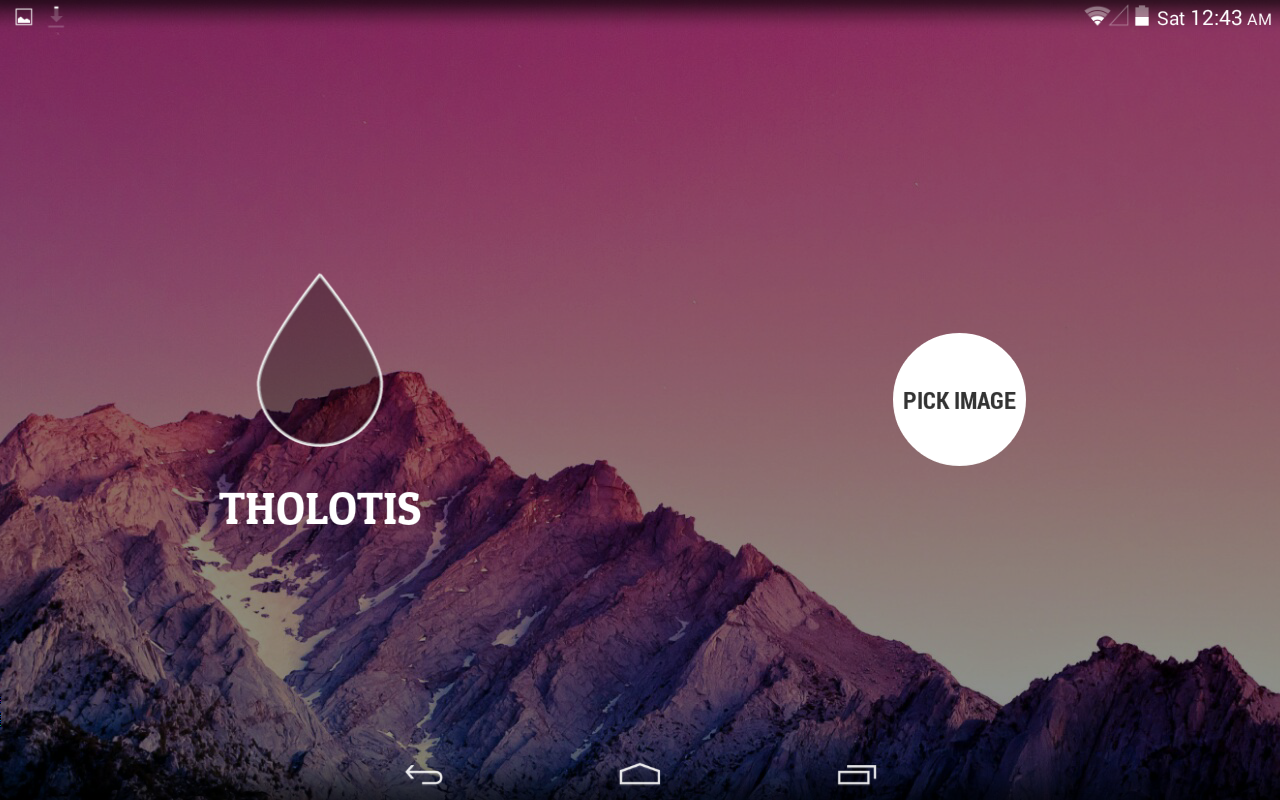
Tholotis will let you blur, dim, and tint your Android wallpapers for pure home screen perfection


Phandroid


Tholotis will let you blur, dim, and tint your Android wallpapers for pure home screen perfection


Tholotis


We’ve been curating hand-picked Android wallpapers for awhile now (see past editions here). Contrary to what some might think, not every awesome piece of high-res art or pictures will make a good fit on your Android’s homescreen. While this largely depends on personal tastes, generally, having a wallpaper that’s considered “too busy” can make it difficult to easily locate icons on your homescreen. This can be especially painful when you locate that perfect wallpaper or want to use a snapshot of a loved one, only to find it conflicts with your theme’s color pallet, or is simply too bright or (again) busy.


Tholotis is a wallpaper app who’s name comes from the Greek word for “blurriness” and looks to fix this first world problem by allowing users to not only defocus or blur backgrounds (making them appear less busy), but also tint/dim background images as well. The app utilizes the same open-source design resources as Muzei and features a clean and minimal interface that’s easy to navigate.


Tholotis screenshots


Although free to download, there is an in-purchase (located by swiping left on the main screen) that unlocks the ability to color tint images as well (see right screenshot above). While this may not sound too appealing, we were surprised to find how wonderfully well this works with photos taken using your phone. Tholotis is definitely one of those must-have Android apps for anyone who enjoys customizing their homescreens to perfection. Download link provided below.


Best new Android apps from August 2014


Phandroid


Best new Android apps from August 2014


August


Womp womp. The last “summer month” is coming to an end. The beaches are getting less crowded. RV’s are being put back in storage. Back-to-school sales can be found in every store. It’s a sad time of year. The good news is we had a bunch of great new Android apps launch in August. Everything from image editors to homescreen replacements to Android Wear apps. If you were busy enjoying the warm weather you may have missed some of these apps. Enjoy!


Afterlight


afterlight


There is no shortage of image editing apps for Android. If you’re into that sort of thing you will be interested in a new one called Afterlight. This app uses a simple design, paired with powerful tools, to give you the look you want in no time. It offers 15 tools, 59 filters, 77 frames, and 66 textures. Afterlight is available in Google Play for $.99.


Amazon Seller


amazon seller


Use the Amazon Seller app for Android to help grow and manage your selling business on Amazon. The app makes it easier than ever for you to quickly identify new selling opportunities on Amazon, list your items for sale, respond to customer questions, manage inventory, search for new things to sell, and estimate profitability. Amazon seller is available for free.


Blur Launcher


blur screen grab


One of the cool features about the Google Now Launcher is the ability to open Google Now by swiping to the left on the homescreen. Wouldn’t it be awesome if you could launch other apps like this? Blur Launcher aims to be that app.  Any developer can create a “page” to be accessed from the homepage. Right now just a few apps work, but more are on the way. Download Blur for free.


Football Schedule ’14


Schedule2014


We’re less than a week away from the first official regular season NFL game. You’re going to want to keep up with your favorite team, see who is playing who, and get reminder for games. Our very own Football Schedule app is a quick and easy way to check the weekly NFL schedule. Download it now from free from Google Play.


Fragment


fragment


As we mentioned above, image editing apps are a dime a dozen on Android. However, Fragment is a completely new way to edit images on your phone. This app gives you the power to transform any image into totally unique, one-of-a-kind prismatic art you’ll want to share with everyone. The only limit is your imagination. Fragment is available for free.


Google News & Weather


googlenewsweatheraam


Remember that random News & Weather app that was always included on Nexus devices? It still exists. Yeah, we were surprised too. This month it finally got an update, and now it’s a really nice looking app. We’re not sure how it fits into Google’s current line-up of news reading apps, but at least it looks modern. Protip: the weather widget is awesome.


HTC Zoe


HTC One Zoe 1


HTC released Zoe for non-HTC devices this month. Zoe is a simple way to create, share and remix professional quality highlight videos—and it’s even better when your friends pitch in. Choose the photos and videos you’d like to share, add a filter to give your highlight video a unique look, and choose the perfect soundtrack. If that sounds cool you can grab it for free.


LAS: Last App Switcher


LAS Last App Switcher screenshots


Multitasking on Android is pretty great, but it’s not perfect. Sometimes switching between apps can be bumpy. The back button behaves differently in all apps, and sometimes the multitasking button is laggy. Last App Switcher utilizes the swipe gesture on the home button to allow quick flipping between your last used app. It’s super fast and fluid. Download LAS for free from the Play Store.


Metromile


metromile


The Metromile app helps make car ownership easier, less expensive, and more enjoyable. Review your driving stats, get insights into your car’s running condition, and even find your car if it’s missing. After you sign up for an account the folks at Metromile will send you their “Metronome” device which plugs into your car’s OBD-II port (if you live in California, Oregon, Washington and Illinois.)


Over


over


What’s this? Another image editing app from August? Apparently the summer is a hot time for editing images. Over is an editor that focuses on adding text to images. They offer a bunch of exclusive fonts and artwork along with some simple image manipulation tools. It’s nice to see an app that just does one thing, but does it really well. Over is available for $1.99.


Snapshot


snapshot


Launching you camera quickly is an important task for every smartphone. Many manufacturers allow the camera to be launched directly from the lockscreen, but sometimes that’s not fast enough either. Snapshot is a new app that launches the camera when you unlock your device in landscape mode. I love this app because it’s also a good reminder to use landscape mode when taking videos. Download Snapshot for free from the Play Store.


SpinMe Alarm Clock


spinme


Suck at waking up? Are you the type of person to set multiple alarms a few minutes apart from each other just to make sure you wake up on time? If so, say hello to SpinMe. This alarm clock is a super clever app designed to get you out of bed on time. The only way to turn off the alarm is by getting out of bed and physically spinning yourself around until the alarm stops! There is no escape!


TapPath


TapPath for Android screenshots


TapPath allows you to customize how clicking a web link in a 3rd party app behaves. A single click on a link will load it in your favorite browser, but multiple clicks is where things get interesting. You could set up double-click to open Pocket, or a triple click could load Pushbullet. TapPath can save you a lot of time when trying to share links across commonly used apps. It’s available for $0.99.


Unclouded


unclouded


Unclouded is a tool to help you analyze and clean your cloud storage (Dropbox and Google Drive). You can see which files or folders are using up storage, see which types of files are using the most space, search files, and more. Unclouded can also be used as a very attractive file manager and cloud file explorer. BOX and OneDrive support are coming soon. You can download it right now for free.


WeTransfer


wetransfer


Sharing big files across the internet can be tough. There are many services out there to help, but most cost money, or at minimum require you to sign up. WeTransfer is different. Simply select your photos or videos (or use the share button), add your friends email address, and upload up to 10GB! Enjoy inspiring backgrounds during the transfer. Your friends will receive an email with a download link. Easy peasy, and all for free.


ANDROID WEAR APPS


I’m Here


imhere


Are you one of those people who constantly “checks-in” everywhere on Facebook? It’s okay, I am too. I’m Here is a simple Android Wear app that allows you to check-in to  Facebook directly from your watch. Checking-in to places can be one of those tasks that distracts you from the moment, which makes this app handy. You can also dictate status updates. I’m Here is available for $0.99.


Showear


showear


A common complaint among Android Wear device owners is mistaken touches while showering. Since the displays are always on they can mistake water drops as finger touches. This is annoying. If you really must wear your smartwatch into the shower you need Showear, an Android Wear pattern lockscreen. Now your shower will have a much harder time pressing buttons and messing things up.


TickTick Wear


ticktick


TickTick for Android Wear lets you access to-dos on wrist without taking phone out of your pocket. This is especially handy when doing things like grocery shopping. You don’t want to be constantly pulling out your phone while walking down the isles. Just quickly check your watch and go find the milk. TickTick Wear works best with TickTick for Android.


Wear Quick SMS


quick sms


Currently you can only reply to SMS on Android Wear if you use the Hangouts app. Wear Quick SMS is a way you can send quick SMS messages to select contacts. First go into the phone app and choose contacts and create custom messages. You will be able to choose a contact and shot message to send right from your wrist. This is the type of thing we want to see for Android Wear. Download Wear Quick SMS for free.